- Why Choosing the Right Hosting Matters
- Shared Hosting vs VPS Hosting
- VPS Hosting vs Dedicated Server
- Which Hosting Type Is Best for WordPress?
- Which Hosting Type Is Best for Ecommerce?
- Which Hosting Type Is Best for SaaS Applications?
- Which Hosting Type Is Best for SEO?
- Common Hosting Selection Mistakes
- Final Verdict
Choosing a hosting solution in 2026 is more complicated than ever. Website owners face dozens of options, each promising better performance, higher uptime, stronger security, and effortless scalability. The challenge is not finding hosting — it is choosing the right hosting. Many businesses overspend on infrastructure they don’t need, while others stay stuck on inadequate environments that throttle performance, hurt SEO rankings, and quietly reduce conversions.
If you’ve ever wondered whether Shared Hosting, VPS Hosting, Dedicated Servers, or Cloud Hosting is the right choice for your website, this guide will help you make an informed decision. We’ll compare each hosting type in detail, explain the real advantages and disadvantages of each, and show which one fits different projects best in 2026.
Why Choosing the Right Hosting Matters
Hosting is the foundation of every website. The quality of your hosting directly impacts website speed, SEO rankings, security, reliability, user experience, conversion rates, and your ability to scale. A slow or unstable hosting environment can hurt your business even when your design and content are excellent — because visitors leave before the page finishes loading, and search engines notice.
Choosing the right infrastructure from the beginning saves money, improves performance, and spares you the painful migrations that come from outgrowing a platform too quickly. If you want to understand the link between hosting and rankings in more depth, see our guide on why fast hosting improves SEO rankings in 2026.
Understanding the Four Main Hosting Types
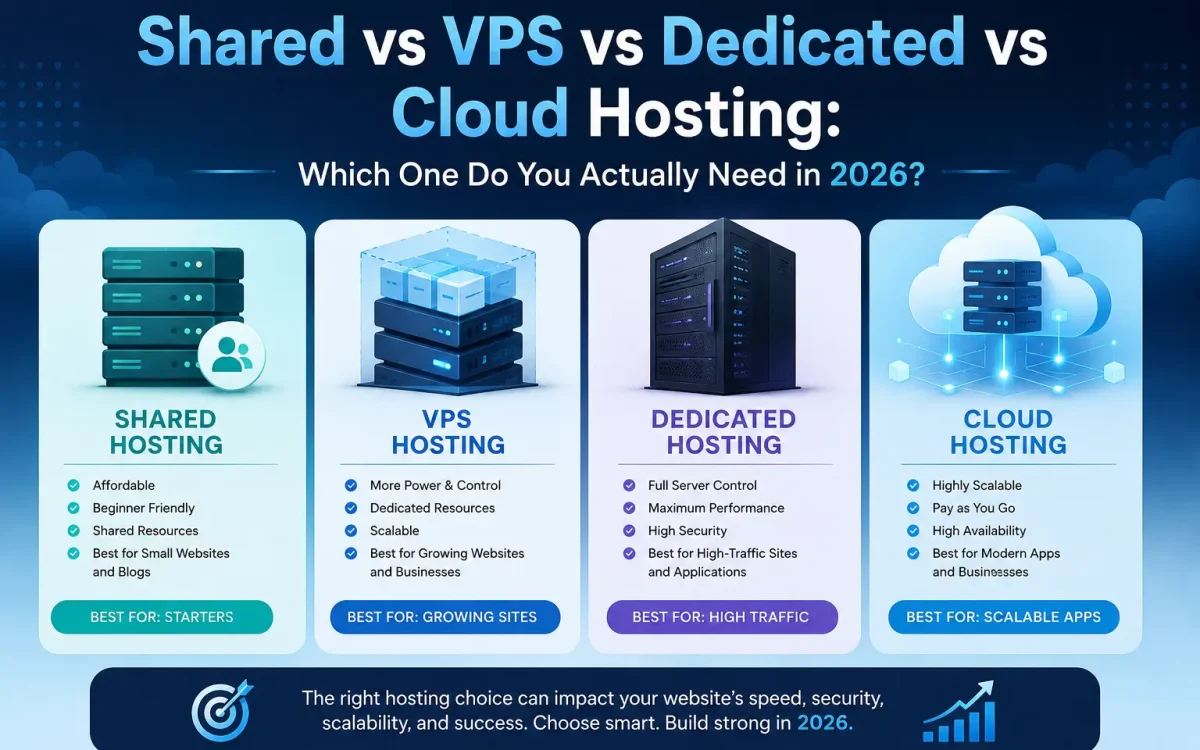
The vast majority of websites fall into one of four categories: Shared Hosting, VPS Hosting, Dedicated Servers, and Cloud Hosting. Each serves a different purpose, and the best option depends on your traffic, budget, technical requirements, and growth plans. Before we break each one down in detail, here is a side-by-side overview to orient you.
Quick Comparison Overview
| Factor | Shared | VPS | Dedicated | Cloud |
|---|---|---|---|---|
| Performance | Low | High | Very High | High |
| Dedicated Resources | No | Yes | Yes (full machine) | Yes (elastic) |
| Scalability | Very limited | Easy | Hard (migration) | Instant |
| Security Isolation | Weak | Strong | Strongest | Strong |
| Technical Skill Needed | None | Some | High | Medium-High |
| Typical Cost / mo | $2–$15 | $10–$100 | $80–$500+ | Usage-based |
| Best Fit | Small sites | Growing business | Heavy workloads | Scaling apps |
Shared Hosting Explained
Shared hosting is the most affordable hosting option. Your website lives on a single server alongside many other websites, and all customers share the same CPU, RAM, storage, and network resources. Splitting one server across hundreds of accounts is exactly what makes shared hosting so cheap.
Advantages of Shared Hosting
- Lowest monthly cost of any hosting type
- Easy setup and beginner friendly
- Fully managed environment
- No server administration required
Disadvantages of Shared Hosting
- Limited performance and strict resource caps
- Less flexibility to install custom software
- Weaker security isolation between accounts
- Performance can be dragged down by “noisy neighbour” sites on the same server
Shared hosting works well for personal blogs, small business websites, portfolio sites, local service pages, and brand-new projects. If you’re a small UK business weighing your first hosting plan, our guide to the best hosting for small businesses in the UK goes deeper on what to look for.
When Shared Hosting Becomes a Problem
The warning signs are usually easy to spot: slow loading times, CPU limit errors, traffic spikes that cause outages, a growing ecommerce store, or rising SEO traffic that the server can no longer handle. Once you hit these limits, upgrading is no longer optional — it’s the only way to protect your performance and your rankings.
VPS Hosting Explained
VPS stands for Virtual Private Server. A single physical server is divided into multiple isolated virtual servers, and each VPS receives its own dedicated CPU cores, RAM, storage, and operating system. Unlike shared hosting, those resources are reserved for you alone — so a busy neighbour can’t slow your site down.
Advantages of VPS Hosting
- Significantly better performance than shared hosting
- Guaranteed, dedicated resources
- Full root access and custom software support
- Improved security through isolation
- Easy, fast scalability
Disadvantages of VPS Hosting
- Higher cost than shared hosting
- Some technical knowledge required (less so with managed plans)
- More responsibility for server management
VPS hosting is ideal for growing businesses, ecommerce stores, agencies, WordPress websites, SaaS startups, and developers. For many businesses it provides the best balance between performance and cost. If you’re unsure whether to manage the server yourself, our comparison of managed vs unmanaged VPS hosting explains the trade-offs, and our VPS hosting explained guide covers the fundamentals in detail.
Dedicated Server Hosting Explained
A dedicated server gives you an entire physical machine with nothing shared. Every CPU cycle, every gigabyte of RAM, and all the storage belong exclusively to your business. That exclusivity is what makes dedicated hosting the performance benchmark the other options are measured against.
Advantages of Dedicated Hosting
- Maximum performance and full hardware control
- Complete customization of the environment
- Strong, single-tenant isolation
- Predictable, never-fluctuating resource availability
Disadvantages of Dedicated Hosting
- Higher costs than VPS or shared hosting
- Hardware management responsibilities
- Less elastic than cloud — scaling often requires a migration
Dedicated servers are commonly used for large ecommerce platforms, enterprise applications, large databases, high-traffic websites, video streaming platforms, and hosting providers themselves. When consistent, uncompromised performance is essential, dedicated hosting remains a powerful option. To see how it compares to raw bare-metal provisioning, read bare metal vs dedicated servers, or learn exactly when you actually need a dedicated server.
Cloud Hosting Explained
Cloud hosting distributes your workload across multiple servers rather than relying on a single machine, and resources are allocated dynamically based on real-time demand. If one node fails, others pick up the load, and if traffic surges, capacity expands automatically. This architecture is what gives cloud hosting its signature resilience and elasticity.
Advantages of Cloud Hosting
- High availability and built-in redundancy
- Elastic scaling on demand
- Geographic flexibility for global audiences
- Pay-as-you-grow pricing model
Disadvantages of Cloud Hosting
- Potentially higher and less predictable costs
- More complex infrastructure and architecture
- Variable pricing that can be hard to forecast
Cloud hosting works well for SaaS platforms, global applications, high-growth startups, API services, enterprise workloads, and multi-region deployments. It excels whenever scalability and availability are the top priorities. Our complete cloud hosting guide breaks the model down further, and if you’re torn between the two most popular options, cloud hosting vs VPS compares them head to head.
Shared Hosting vs VPS Hosting
This is the most common upgrade decision website owners face. On performance, VPS wins easily — dedicated CPU and RAM dramatically improve speed. On security, VPS also wins, because greater isolation reduces risk. On flexibility, VPS again takes it, letting you install custom applications and server software. The one category shared hosting wins is cost: it remains the cheaper option. The bottom line: if your website receives more than a few thousand monthly visitors, VPS hosting is usually the better long-term investment.
VPS Hosting vs Dedicated Server
Many businesses struggle with this decision. A dedicated server wins on raw performance and resource consistency — physical hardware is unmatched and resources never fluctuate. But VPS wins on scalability and cost efficiency, because upgrades are faster and the value for most workloads is excellent. The practical advice for most growing businesses: start with VPS hosting and move to a dedicated server only when your workload genuinely justifies it.
Dedicated Server vs Cloud Hosting
A dedicated server wins on hardware control and cost predictability — you own the physical machine and your monthly bill stays fixed. Cloud hosting wins on availability and scaling, because workloads survive hardware failures and capacity can expand almost instantly. For rapidly growing or globally distributed applications, cloud hosting is generally the superior choice; for steady, predictable heavy workloads, dedicated still makes strong financial sense.
Which Hosting Type Is Best for WordPress?
The right WordPress platform depends on scale. Small WordPress sites run fine on shared hosting. Business WordPress sites belong on VPS hosting. WooCommerce stores need VPS or cloud hosting, and high-traffic WordPress sites should run on a dedicated server or cloud. In practice, most serious WordPress websites perform dramatically better on VPS infrastructure than on shared hosting. For a focused breakdown, see our guide to the best WordPress hosting in 2026.
Which Hosting Type Is Best for Ecommerce?
Ecommerce stores demand fast page loading, reliable uptime, secure transactions, and room to scale. As a rule of thumb: small stores do well on VPS hosting, medium stores on a high-performance VPS, large stores on cloud hosting, and enterprise stores on a cloud plus dedicated hybrid setup. Because every second of load time affects your conversion rate, this is one area where under-investing costs you real revenue. Our guide to the best hosting for ecommerce websites covers the requirements in depth.
Which Hosting Type Is Best for SaaS Applications?
Modern SaaS platforms typically require scalability, robust APIs, high availability, and database replication. Cloud hosting is the recommended choice here, because cloud environments are specifically designed for exactly this kind of elastic, fault-tolerant workload. Many SaaS teams start on a powerful VPS to control early costs, then transition to cloud as their user base and reliability requirements grow.
Which Hosting Type Is Best for SEO?
Google prioritizes user experience, and hosting directly affects the signals it measures: TTFB (time to first byte), Core Web Vitals, availability, and crawl efficiency. Ranked purely by SEO potential, the order is generally cloud hosting, then dedicated, then VPS, then shared. That said, a properly optimized VPS often outperforms poorly configured cloud infrastructure — configuration matters as much as category. If server speed is your concern, learn how to reduce TTFB below 200ms.
Cost Comparison in 2026
Typical monthly pricing in 2026 looks roughly like this: shared hosting runs $2–$15, VPS hosting $10–$100, dedicated servers $80–$500+, and cloud hosting varies depending on usage. Price should never be the only decision factor, though — performance, growth potential, and reliability matter far more over the life of a website. The cheapest plan that can’t handle your traffic is the most expensive choice you can make.
Common Hosting Selection Mistakes
- Choosing shared hosting for ecommerce — usually results in slow performance and lost sales.
- Buying a dedicated server too early — many businesses waste money on resources they never use.
- Ignoring future growth — migrating later can be expensive and disruptive.
- Focusing only on price — cheap hosting often costs more through lost sales and weaker SEO.
- Assuming cloud is always better — cloud is powerful, but not every project needs it.
A Simple Decision Framework
If you want a fast answer, use this framework. Choose shared hosting if you’re launching a small website, budget is your primary concern, and traffic is low. Choose VPS hosting if your business is growing, you need better performance and more control, or you run WordPress or ecommerce. Choose dedicated hosting if you require maximum performance, your workloads are resource intensive, and predictable hardware access is critical. Choose cloud hosting if you need elastic scalability, serve global audiences, depend on high availability, or your traffic fluctuates significantly.
Why VPS Hosting Is Often the Sweet Spot
For most businesses in 2026, VPS hosting represents the ideal middle ground. It delivers excellent performance, dedicated resources, strong security, reasonable costs, and easy scaling all at once. That combination is exactly why so many growing businesses eventually migrate from shared hosting to VPS infrastructure. When you’re ready to make that move, our step-by-step walkthrough on how to migrate from shared hosting to a VPS without downtime shows you exactly how.
Why UK Speed Provides the Right Hosting Options
UK Speed offers hosting solutions designed for every stage of growth — shared hosting, VPS hosting, cloud infrastructure, and dedicated servers. Across all of them you benefit from high-performance AMD EPYC processors, enterprise NVMe storage, low-latency UK connectivity, full scalability options, strong uptime guarantees, and advanced security features. That means you can choose the right platform for today while keeping a clear, friction-free upgrade path for the future.
Final Verdict
There is no single hosting solution that is perfect for every website. Shared hosting remains a good starting point for small projects. VPS hosting delivers the best balance of performance and affordability for most growing businesses. Dedicated servers provide unmatched control and raw performance, while cloud hosting offers exceptional scalability and availability for modern applications.
The key is choosing infrastructure that matches your current requirements while supporting future growth. In 2026, most business websites, ecommerce stores, and professional WordPress projects will find VPS hosting to be the ideal choice, while larger organizations increasingly adopt cloud or hybrid infrastructure for maximum flexibility and resilience.
Looking for fast, secure hosting?
Visit UK Speed for cloud servers, VPS NVMe, and dedicated hosting tailored for performance.
Further Reading
For an authoritative reference on this topic, see Cloudflare Learning — What Is Cloud Computing.