- What is Redis Object Cache?
- Why Use Redis for WordPress Caching?
- Prerequisites for Setting Up Redis
- Step-by-Step Guide to Install and Configure Redis for WordPress
- How to Force Redis Caching for Specific Queries
- Common Redis Caching Issues and How to Fix Them
- How Redis Improves Website Performance
- How UKSpeed Can Help Optimize Redis for Your WordPress Site
- Final Thoughts
When it comes to optimizing the performance of your WordPress website, caching is one of the most powerful techniques available. In 2026, as websites become more complex and user expectations for speed increase, leveraging object caching solutions like Redis can significantly improve website performance.
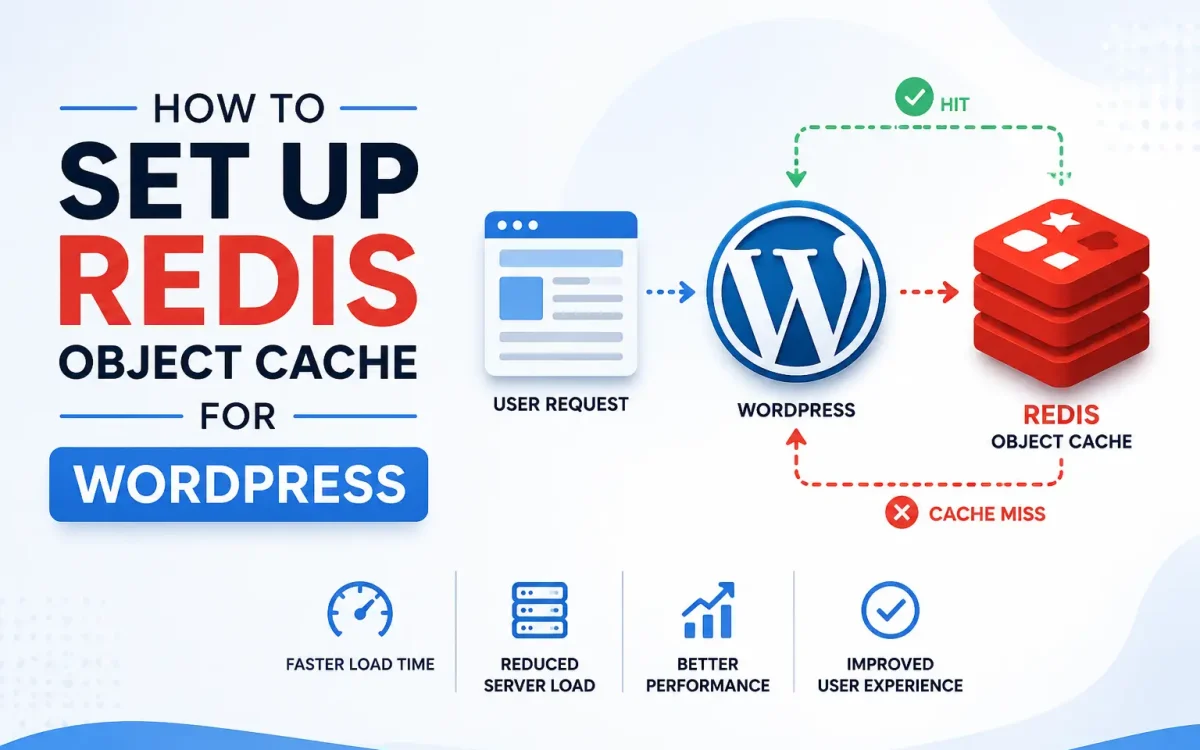
Redis Object Cache is an in-memory key-value store that can help speed up WordPress by reducing the time it takes to retrieve data from the database. Redis stores frequently accessed data in memory, allowing your website to serve data much faster, reducing database load and improving the overall response time of your website.
In this comprehensive guide, we’ll walk you through the process of setting up Redis Object Cache for WordPress, covering everything from installation to configuration. We’ll also explain how UKSpeed, with its high-performance infrastructure, can further optimize the speed and reliability of your WordPress site.
What is Redis Object Cache?
Redis is an open-source, in-memory data structure store that functions as a key-value database. It supports various data structures such as strings, hashes, lists, sets, and more. When used as an object cache in WordPress, Redis stores data that would typically be retrieved from the database in memory. This significantly reduces the time it takes to access frequently used data.
Redis Object Cache helps WordPress websites by:
- Caching database queries and objects
- Reducing database load
- Speeding up page load times
- Enhancing overall performance
By caching data in memory, Redis makes it faster for WordPress to retrieve objects like post content, user data, and other frequently requested items.
Why Use Redis for WordPress Caching?
Using Redis for caching in WordPress offers several benefits that can enhance both the performance and scalability of your site:
1. Improved Speed
Redis stores data in memory (RAM), which is much faster than accessing it from disk-based storage, such as your website’s MySQL database. This leads to significantly faster page load times.
2. Reduced Database Load
With Redis handling repetitive data retrieval tasks, your database doesn’t have to process the same requests repeatedly. This reduces the load on your MySQL server and improves overall website performance.
3. Better Scalability
As your WordPress website grows, the need for fast data retrieval and the ability to scale seamlessly becomes crucial. Redis allows for scalable and efficient caching, enabling WordPress to handle more traffic and requests without compromising speed.
4. Cost-Effective
Caching solutions like Redis are often more cost-effective than adding more server resources, as they help minimize the strain on your database and reduce server costs.
5. Enhanced User Experience
Faster websites lead to a better user experience. By speeding up your website with Redis, you’ll provide a seamless browsing experience, which can lead to higher user engagement, longer time on site, and increased conversions.
Prerequisites for Setting Up Redis
Before setting up Redis for WordPress, there are a few things you need:
1. A Hosting Environment that Supports Redis
Ensure that your hosting provider supports Redis. For optimal performance, UKSpeed provides high-performance hosting environments that include Redis support, ensuring a fast and reliable caching solution for WordPress.
2. Access to Server or cPanel
To install and configure Redis on your server, you will need access to your server or hosting control panel (such as cPanel or SSH access) to make the necessary configuration changes.
3. Redis Installed on Your Server
Redis must be installed and running on your server. If you’re using UKSpeed, Redis is supported out-of-the-box with their server configurations, so you won’t need to worry about installation.
4. WordPress Installed and Working
This guide assumes you already have WordPress installed on your server. If you’re using UKSpeed for WordPress hosting, you’ll already have a fast and optimized environment for setting up Redis.
Step-by-Step Guide to Install and Configure Redis for WordPress
Step 1: Install Redis on Your Server
If Redis is not already installed, you will need to install it on your server. Follow the steps below for a Linux-based server.
- For Ubuntu/Debian:
sudo apt update
sudo apt install redis-server- For CentOS/RHEL:
sudo yum install epel-release
sudo yum install redis
Once Redis is installed, ensure it’s running properly:
sudo systemctl start redis
sudo systemctl enable redis
Verify Redis is working:
redis-cli pingYou should see a response of PONG.
Step 2: Install Redis Object Cache Plugin in WordPress
- Go to the WordPress admin panel.
- Navigate to Plugins > Add New.
- Search for “Redis Object Cache.”
- Install and activate the plugin called Redis Object Cache by Till Krüss.
Step 3: Configure Redis in WordPress
After activating the plugin, you’ll need to configure WordPress to connect to Redis:
- Edit your wp-config.php file:
Add the following line before the “Happy blogging” line:define('WP_REDIS_HOST', '127.0.0.1');
define('WP_REDIS_PORT', 6379); - Enable Redis Object Cache:
- Go to Settings > Redis in your WordPress dashboard.
- Click the Enable Object Cache button.
Step 4: Verify Redis is Working
Once Redis is enabled, go to the Redis settings page in WordPress and check if it shows as “Connected.” You can also use tools like Query Monitor to monitor Redis cache hits and misses.
How to Force Redis Caching for Specific Queries
If you want to cache specific queries for a certain post, page, or custom query, you can use Redis to cache the data manually by interacting with the WordPress API.
Example:
global $wpdb;
$results = wp_cache_get('your_query_key');
if ( false === $results ) {
    $results = $wpdb->get_results( 'SELECT * FROM wp_posts WHERE post_type = "post"' );
    wp_cache_set( 'your_query_key', $results, '', 3600 ); // Cache for 1 hour
}
This allows you to cache custom queries that are commonly used, reducing the database load and improving response time.
Common Redis Caching Issues and How to Fix Them
Issue 1: Redis Cache Not Clearing Automatically
Sometimes, Redis objects may not clear automatically after updates. You can force clearing by using a plugin like Redis Object Cache or manually flushing Redis cache from the command line:
redis-cli flushallIssue 2: Redis Cache Not Connected
If Redis is not connected, make sure that the Redis service is running and that your wp-config.php file has the correct Redis host and port configured.
Issue 3: Slow Website After Redis Setup
If your website is slower after enabling Redis, it may be due to improper Redis configuration or server resource limitations. Ensure that Redis has enough memory and that your server is properly optimized. UKSpeed offers optimized servers with Redis configuration for faster WordPress performance.
How Redis Improves Website Performance
Implementing Redis object caching can dramatically improve your WordPress site’s performance:
- Faster Data Access: By storing frequently accessed data in memory, Redis reduces the time it takes to retrieve data from the database.
- Reduced Server Load: Redis minimizes the need to query the database for frequently requested data, freeing up server resources.
- Improved User Experience: With reduced TTFB (Time to First Byte), pages load faster, improving the user experience.
- Scalability: Redis allows websites to handle higher traffic loads with minimal additional infrastructure.
How UKSpeed Can Help Optimize Redis for Your WordPress Site
At UKSpeed, we provide fully managed WordPress hosting with Redis object caching support out of the box. Our optimized infrastructure is designed to help you leverage Redis caching for improved website speed and performance. With UKSpeed, you get high-performance servers, expert support, and the best WordPress environment to help your website run faster and more efficiently.
We ensure that your Redis setup is correctly implemented and configured, allowing you to get the most out of caching for your WordPress site.
Final Thoughts
Setting up Redis Object Cache for WordPress is a highly effective way to boost your website’s performance, reduce database load, and improve page load times. Whether you’re running a personal blog or a high-traffic eCommerce site, Redis caching can make a huge difference. By following this guide and leveraging the power of UKSpeed’s high-performance hosting, you can ensure that your WordPress site is optimized for speed and scalability.
Further Reading
For an authoritative reference on this topic, see WordPress.org — Optimization Documentation.
Looking for fast, secure hosting?
Visit UK Speed for cloud servers, VPS NVMe, and dedicated hosting tailored for performance.